Toolkit · $79
Small Business Security Essentials Toolkit
A complete, working security program for businesses of roughly 5–100 people without a full-time security team: a scored self-assessment that tells you what to fix first, ten editable policies, ten spreadsheets, five incident playbooks with the messages already written, and a fully worked example business to copy from. Built from the 21 guides on this site.
Instant download (ZIP: DOCX, PDF, XLSX, and a calendar file). Works with Microsoft Office, Google Docs and Sheets, and LibreOffice. Version 2.0, October 2026.
Why it exists
Most owners already know they should have MFA, a password manager, tested backups, and a plan for when something goes wrong. What is usually missing is the order to do it in, the written rule, the owner, and proof that it was done. This toolkit turns the practical advice in our guides into a program you can start in an hour and finish in a quarter.
Start in one hour
The Quick Start walks you through four wins: fill in your emergency contacts card, adopt the call-back rule for payment changes, check who has MFA, and take the 32-question Self-Assessment. The Self-Assessment scores you by area and builds a ranked priority list. For each gap it gives the first fix, the toolkit file to use, the free guide, and the roadmap week.
See it done before you do it
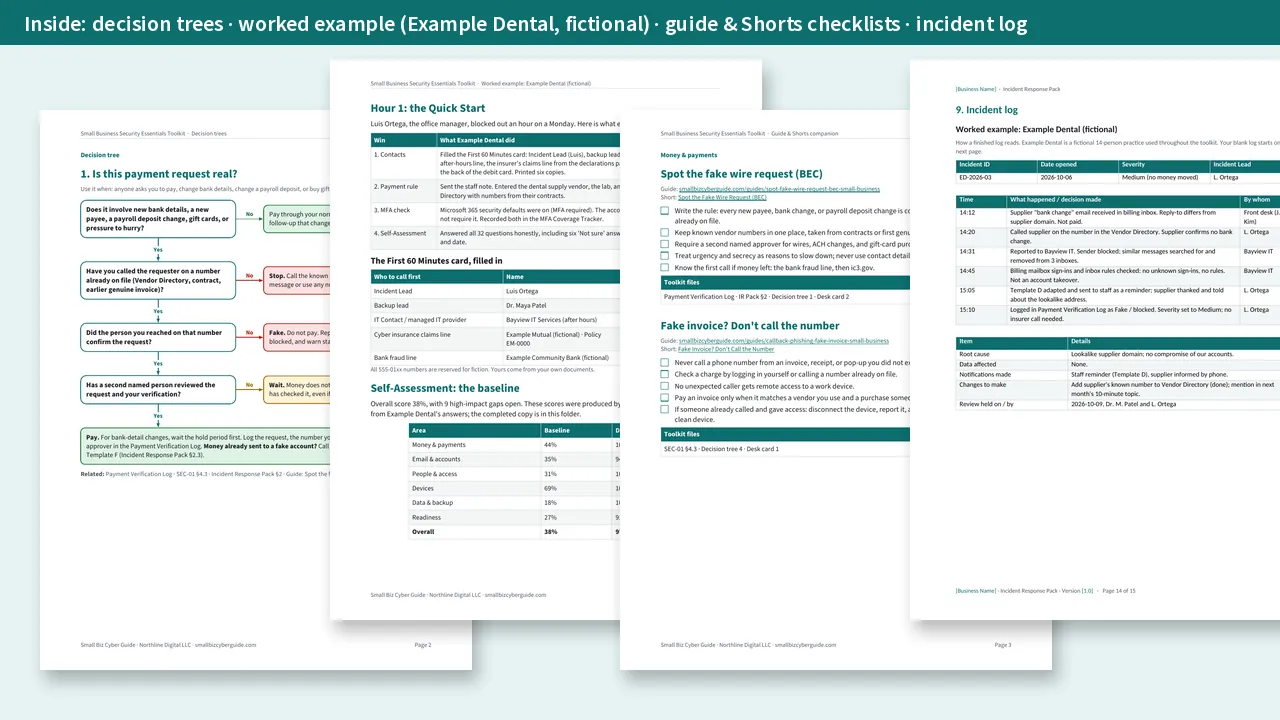
Every template comes with a worked example from Example Dental, a fictional 14-person practice. You get its completed self-assessment, a completed Password & MFA policy, a completed offboarding checklist, a completed insurance evidence tracker, a filled-in incident log, and a walkthrough of its first 90 days. Gray example rows in every spreadsheet show what a good entry looks like and are left out of the totals.
What's inside
Question self-assessment
Scores by area and ranks your gaps into a priority list tied to files, guides, and roadmap weeks.
Editable policies
DOCX + PDF, with a fill-in worksheet that lists every blank and Example Dental's answer.
Working spreadsheets
Dropdowns, status colors, calculated due dates, coverage, overdue flags, and renewal reminders.
Incident playbooks
Plus a First 60 Minutes card, nine message templates, a tabletop kit, and an incident log.
Decision trees
Plus printable desk cards and handoff sheets for your insurer, bank, IT provider, and customers.
Guide & Shorts checklists
A short checklist for each free guide, with the matching 60-second Short where there is one.
Insurance controls mapped
Evidence to collect for each control, and which file produces it.
Day rollout plan
Week-by-week roadmap plus a fillable workbook for contacts, decisions, and checkpoints.
The ten policies
- Acceptable Use
- Password & MFA
- Access Control
- Employee Offboarding
- Contractor & Vendor Access
- Remote Work & BYOD
- Data Sharing & Link Sharing
- Backup & Recovery
- Incident Response
- Security Awareness
The ten spreadsheets
- Security Self-Assessment: scorecard by area, score history, and an auto-ranked priority list.
- Employee Offboarding Checklist: 36 steps ordered same day, 3 days, and 30 days, with owners and a progress tracker. Built on our offboarding guide.
- Contractor & Vendor Access Register: end dates, days left, overdue flags, and an 8-question vendor security check. See contractor access without shared logins.
- Asset & Admin Inventory: devices, cloud apps, admin accounts, and network gear.
- MFA Coverage Tracker: coverage by system and by person. See MFA for Microsoft 365.
- Encryption Inventory: BitLocker / FileVault status and recovery-key filing. See disk encryption for every laptop.
- Backup Inventory & Restore-Test Log: next test due, weekly checks, and a continuity plan. See backup for small business.
- Cyber Insurance Evidence Tracker: the 12 controls insurers commonly ask about, with the evidence to collect for each.
- Payment Verification Log: every bank-detail change and urgent payment request, with the call-back, second approver, and hold date. See spot the fake wire request.
- Security Calendar & Renewals: recurring tasks and renewal reminders, plus a calendar file you can import into Outlook, Google Calendar, or Apple Calendar.
Incident response pack
- First 60 Minutes card to print for every desk
- Playbooks: fake wire / business email compromise, ransomware, account takeover, lost or stolen device, and data sent to the wrong person
- Nine templates: staff alert and update, customer holding statement, fake-payment warning, insurer first notice, bank recall script, front-desk script, "our mailbox was misused" notice, and all-clear
- 45-minute tabletop exercise kit with a ready-made scenario and debrief
- Incident log with a filled-in example entry
Decision trees, desk cards, and handoff sheets
- Decision trees: Is this payment request real? Which playbook do I use? Can I share this file? Should I open this attachment, QR code, or invoice? Someone is leaving: what happens when?
- Desk cards: 10 rules for everyone, Before money moves, and Report it now
- Fillable handoff sheets: what to hand your insurer, your bank, your IT provider, and a customer who asks about security
Guide & Shorts companion
A vendor-neutral checklist for each of the 21 free guides, with the guide link, the matching Short where there is one, the toolkit files to use, and the insurance control it supports. Read or watch, then tick the boxes.
Why $79
Template packs give you documents. This toolkit gives you a connected program:
| You need to… | What the toolkit gives you |
|---|---|
| Know what to fix first | A scored self-assessment that ranks your gaps and points each one to a file, a guide, and a roadmap week |
| See how to fill templates in | A fictional business that has already completed them, plus gray example rows in every spreadsheet |
| Decide fast under pressure | Decision trees, desk cards, and five playbooks with the messages already written |
| Answer your insurer, bank, or a customer | Evidence mapped to 12 insurance controls and ready-to-fill handoff sheets |
| Keep it going after week 13 | A security calendar, renewal reminders, a tabletop kit, and a re-take of the self-assessment |
| Train staff without a course | A checklist for every free guide and Short, and a 12-month training topic calendar |
Who it's for
Owners, office managers, and operations leads at small businesses, and the IT providers who support them. It is especially useful when a cyber insurance renewal, a customer security questionnaire, or a recent close call has you asking what you actually have in place.
FAQ
- Where do I start?
- Open the Quick Start in the 00-Start-Here folder. In about an hour you will have a contacts card, a payment call-back rule, an MFA check, and a priority list.
- Do I need to be technical?
- No. The documents are written for owners and office managers. Where a step needs an admin setting, they say what to turn on, and the IT handoff sheet tells your IT provider or admin exactly what you need.
- How long does it take?
- The first hour gets you four quick wins. The roadmap spreads the rest over 13 weeks, a few tasks per week. With an IT provider helping, you can move faster.
- Will it help with cyber insurance?
- The evidence tracker follows the same 12 controls as our free renewal checklist and shows which document or spreadsheet produces the evidence for each. Your insurer decides coverage and pricing; the toolkit helps you answer accurately and show your work.
- Is Example Dental a real business?
- No. Example Dental and everyone in it are fictional, so you can see what a finished entry looks like before you fill in your own.
- Can I use it for clients?
- The license covers one organization. Consultants and MSPs can email us about a multi-client license.
- What is the refund policy?
- We offer a 14-day refund. If the toolkit is not right for your business, request a refund within 14 days of purchase.
- Do I get updates?
- Yes. Updated versions appear in your Gumroad library under the same purchase.
- Are there affiliate links in the toolkit?
- The tool guide includes a few labeled affiliate links (NordPass, NordLayer, NordVPN, IDrive). Recommendations are not for sale, and most controls in the toolkit need no new purchase. See the affiliate disclosure.
By Christopher Smith, MS Cyber Security. Published by Northline Digital LLC, Michigan. Checkout and delivery through Gumroad.